Applications View
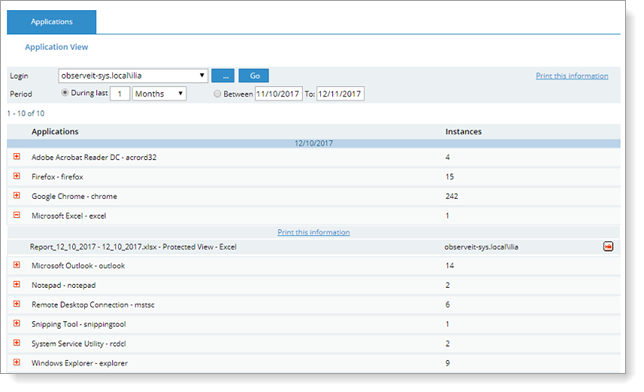
The Applications View of the User Diary enables you to view a list of all the applications, resources, registry paths, URLs, and so on, that were accessed by the specified user login. This view is useful if you have many recorded sessions and you do not want to review each session, but prefer to see which resources (applications, files and directories, and so on) were accessed by the user. These resources are displayed in reverse chronological order for the selected user, making the latest sessions easy to identify.
By clicking the Print this information link, you can export the Applications metadata to an external window for easier printing and for usage in Microsoft Excel.
To view the applications that were accessed by a user
-
Click Applications in the left menu of the User Diary.
- From the Login drop-down list, select the login name of the user you want to view.
You can also enter text directly in the Login field to search for the required user name or click the
 button and select it from the Logins List popup window.
 -
Select the period of time or date range for which you want to display the applications.
- Click the Go button.
The page refreshes to display all the applications (with number of instances) that were accessed by the specified user.
To view more details, click the
 icon next to an application. To replay the selected item in the Session Player, click the Video
  icon.
icon.



See Also